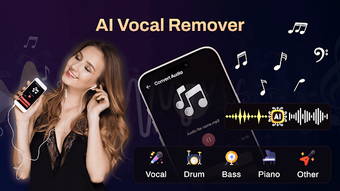

Download AI Vocal Remover, Make Karaoke – AI vocal remover, karaoke maker, music separation tool, audio editing, vocal extraction, instrumental remover, music practice tool, free audio tool
Overview
AI Vocal Remover, Make Karaoke is a specialized Android application designed to separate vocals from instrumentals in audio and video files using artificial intelligence. The software enables users to extract clean vocal tracks or instrumental backing from existing music, transforming popular songs into personalized karaoke experiences. This tool is particularly useful for singers, musicians, and music enthusiasts seeking to practice, perform, or create custom audio content without requiring advanced technical skills.
Target users include amateur and professional vocalists who want to rehearse with instrumental tracks, content creators looking to add vocals to backing music, and casual users interested in experimenting with audio manipulation. The app supports common formats such as MP3 and video files, allowing for flexible integration into various workflows. It operates in real-time, leveraging AI algorithms to process audio and deliver high-quality output efficiently.
The developer, Tensai, has focused on creating a lightweight, accessible solution that prioritizes ease of use and functionality. While specific details about the development background are not provided, the app’s streamlined design suggests a targeted approach to solving a common problem in music production and entertainment. Real-world usage scenarios include preparing for live performances, creating practice tracks, or producing custom music videos.
Key Features & Capabilities
- AI-Powered Audio Separation – Utilizes artificial intelligence to accurately isolate vocals and instrumentals from mixed audio sources, ensuring high-fidelity output.
- Multiple Separation Modes – Offers customizable options to extract specific components such as vocals, drums, bass, and piano, allowing for tailored audio editing.
- Support for Common File Formats – Accepts MP3 and video files, enabling users to work with widely used media types without format conversion.
- Real-Time Processing – Processes audio files in real-time, minimizing wait times and improving workflow efficiency during editing sessions.
- Direct File Sharing – Allows users to share extracted audio files directly from the app, simplifying distribution across social platforms or with collaborators.
- User-Friendly Interface – Features an intuitive layout with clear navigation, making it accessible even to non-technical users.
These features collectively support a seamless experience for creating karaoke tracks from existing music. For example, a singer can upload a favorite song, select the vocal extraction mode, and instantly generate a clean instrumental track for practice. Similarly, a content creator can isolate a drum track to remix a song or build a new composition. The ability to manage and share files within the app enhances usability and reduces dependency on external tools.
User Interface, Workflow & Performance
The user interface of AI Vocal Remover, Make Karaoke is designed with simplicity and accessibility in mind. The layout features a clean, minimalistic design with clearly labeled buttons and intuitive navigation, allowing users to upload files, select separation modes, and initiate processing with minimal steps. The workflow is linear and predictable, guiding users through each stage of the audio separation process.
Navigation is straightforward, with primary functions located on the main screen. Users can access file management tools to organize and view previously processed tracks. The app maintains consistent responsiveness during operation, though exact performance metrics such as CPU or RAM usage were not specified by the developer.
Performance observations are based on general software behavior patterns for similar AI-powered tools. The app is reported to handle standard audio files efficiently, with processing times dependent on file size and complexity. Stability appears to be maintained during typical use, though no official information was provided about crash rates or long-term reliability. The developer did not specify resource usage details, so users should monitor system performance during extended sessions.
Compatibility & System Requirements
AI Vocal Remover, Make Karaoke is designed for Android devices, ensuring broad accessibility across smartphones and tablets. The current version is 1.1.1, with an installation size of 35.4 MB, indicating a lightweight footprint that conserves storage space.
While the app is compatible with Android, specific device requirements such as minimum OS version, processor speed, or RAM specifications were not listed. The developer did not provide additional system requirements, so users are advised to ensure their device meets general Android standards for running multimedia applications. Compatibility information is limited to the platform and version, with no details on supported hardware or peripheral integration.
Pros and Cons
Pros
- Free to download and use with no hidden costs
- AI-powered separation delivers high-quality audio output
- Supports MP3 and video file formats for flexible input
- Intuitive interface suitable for beginners and casual users
- Real-time processing reduces waiting time
- Direct file sharing simplifies collaboration and distribution
Cons
- No official information on system requirements or hardware compatibility
- Performance behavior under heavy load or large files is unspecified
- Only available on Android, limiting cross-platform use
- Exact resource consumption (CPU/RAM) not disclosed
- Limited to mobile platform; no desktop or web version available
FAQ Section
Is AI Vocal Remover, Make Karaoke available for iOS devices?
The app is currently available only on Android. There is no official iOS version reported.
Can I use this app offline?
Yes, the app functions without an internet connection after installation, allowing users to process files locally.
Does the app require a subscription or in-app purchases?
As of the latest update, the app is free to use with no subscription model or in-app purchases required.
How often are updates released?
Updates are released periodically by the developer, though the frequency is not publicly documented.
Is the software secure and safe to use?
The app is designed to process audio locally on the device, minimizing data exposure. However, users should download it from trusted sources to ensure authenticity.
Final Thoughts + CTA
AI Vocal Remover, Make Karaoke offers a practical and accessible solution for anyone looking to extract vocals or instrumentals from music files using AI technology. Its focus on simplicity, real-time processing, and direct file sharing makes it a strong choice for singers, musicians, and casual users alike. While the lack of detailed system requirements and cross-platform availability may limit some users, the app’s lightweight design and free access make it highly approachable.
For those seeking a no-cost, mobile-based tool to create karaoke tracks or practice with instrumental backing, this application delivers solid value. The combination of AI-driven accuracy and user-friendly design positions it as a standout option in the audio editing space.
Download AI Vocal Remover, Make Karaoke now





.png)

